Smart Steps: A Handwritten Font That Adds Heart to Craft and Product Design
As a crafter and small shop owner, I know how important it is to have the right design elements that stand out while staying functional. That’s why I keep coming back to Smart Steps—a soft, approachable handwriting font that feels both personal and professional. Whether I'm designing stickers, labels, or printable wall art, this font brings a warm, handcrafted charm that my customers love.
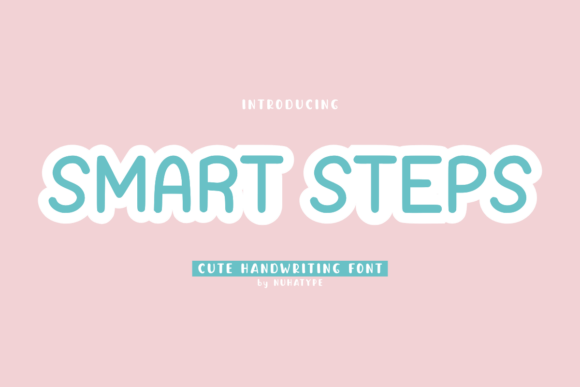
What makes Smart Steps special is its natural flow and gentle curves. It doesn’t look stiff or computer-generated. Instead, it mimics real handwriting with just the right amount of variation and charm. It’s ideal for projects where you want to communicate sincerity, creativity, or a cozy, handmade feel. From kids’ birthday invitations to boutique-style product tags, this font adapts beautifully across a range of uses.
Perfect for Handmade Labels and Product Packaging
If you sell candles, bath bombs, or small-batch food items, your labels need to be clear, readable, and visually appealing. With Smart Steps, I’ve created custom labels that feel personal yet polished. The font’s legibility at small sizes makes it great for sticker labels and swing tags, especially when using a Cricut or Silhouette cutting machine. Even when scaled down, the soft strokes and open spacing keep the text easy to read.
For packaging, this font adds a boutique-like quality. Whether it’s a thank-you note tucked into a gift box or a custom label on a mason jar, Smart Steps gives products a hand-finished look that customers associate with care and craftsmanship.
Great for Invitations, Greeting Cards, and Wedding Stationery
When designing invitations or greeting cards, I often look for fonts that are expressive without being overwhelming. Smart Steps strikes the perfect balance. It’s friendly enough for a child’s birthday card and elegant enough for wedding stationery. I’ve used it for welcome signs, place cards, and even custom thank-you notes for clients, and it always reads as warm and personal.
Because of its natural handwriting style, this font pairs well with clean sans serif fonts for a modern, layered look. Try using Smart Steps for names or headlines and a simple sans serif like Montserrat or Lato for supporting text. It also works well with serif fonts for a more traditional or vintage-inspired layout.
Ideal for Planner Pages, Printables, and Digital Downloads
If you create digital products like planners, calendars, or social media templates, you know how important font readability and style are. Smart Steps is a go-to for titles, section headers, and decorative phrases in my printable planners. It’s soft enough to feel inviting but structured enough to hold its own in a layout.
For digital downloads, this font adds a personal touch that helps products stand out. Whether it’s a quote poster or a set of holiday cards, Smart Steps brings a sense of authenticity that buyers appreciate. Just be sure to use it at an appropriate size—this is a display font best used for short phrases or headings rather than long paragraphs.
Stylish Yet Practical for Signs, Mugs, and Merchandise
From farmhouse wall signs to custom mugs and tote bags, Smart Steps adds a charming, approachable tone. I’ve used it for seasonal signs, like “Welcome Spring” or “Merry Everything,” and it always reads clearly, even from a distance. When designing for vinyl cutting or embroidery, the font’s clean outlines and soft edges make it easy to work with in design software like Cricut Design Space or Silhouette Studio.
For merchandise like shirts or tote bags, this font gives a boutique-style finish. It’s versatile enough to work with both minimalist and playful designs. I especially like using it for custom names on children’s clothing or for short motivational phrases on mugs and tumblers.
Font Features That Make a Difference
One of the things I appreciate most about Smart Steps is the attention to detail in its design. It includes alternate characters, ligatures, and swashes that let you customize the look for different projects. Whether you want a more casual or refined appearance, these stylistic options give you creative flexibility.
The font also supports multiple file formats—like OTF, TTF, and WOFF—which makes it compatible with most design programs and cutting machines. And if you create content for an international audience, the multilingual support is a nice bonus that ensures your text looks correct across different languages.
Commercial Use and Licensing Made Simple
As a small business owner selling physical products, printables, or SVG files, I need fonts that come with clear commercial licenses. Smart Steps includes a license that covers use in both physical and digital products, which means I can confidently use it in items I sell without worrying about copyright issues. Always double-check the specific license terms, but in my experience, this font is well-suited for Etsy shops, Canva templates, and client design work.
Final Tips for Getting the Most From Smart Steps
Here are a few practical tips I’ve picked up from using Smart Steps in real projects:
- Use it for short phrases, titles, and names—this is not a font for long paragraphs.
- Check readability at small sizes, especially for cutting machines and printed labels.
- Pair it with a clean sans serif or a bold serif for contrast and visual interest.
- Preview your text in mockups before printing to ensure clarity and alignment.
- Take advantage of alternate characters and ligatures to customize your design.
Whether you're creating planner stickers, wedding signage, or boutique-style packaging, Smart Steps brings a soft, personable touch that elevates your work. It's a font that feels both timeless and fresh—perfect for makers who want to connect with customers through thoughtful, handmade design.